Variables in bash script
Variables are the backbone of any scripting language, and Bash is no exception. They allow you to store and manipulate data, making your scripts dynamic and powerful. In this guide, we’ll explore everything you need to know about variables in Bash scripting.
Assigning Values to Variables
my_variable="Hello, World!"
Using Variables
Once you’ve assigned a value to a variable, you can use it throughout your script by prefixing it with a dollar sign ($). This is known as variable expansion.
echo "My variable is: $my_variable"
Unsetting Variables
If you need to remove a variable from your script, you can use the unset command followed by the variable name.
unset my_variable
Exporting Variables
Bash maintains variables in two distinct areas: the environment and the shell’s local scope. If you want a variable to be accessible to child processes or scripts, you need to export it to the environment using the export keyword.
export my_variable
Variable Scope
Variables in Bash can have either local or global scope. Local variables are limited to the current shell or script, while global variables are accessible to any child processes or scripts.
Grouping Commands
Parentheses (()) are useful for grouping commands in Bash. When you enclose commands within parentheses, they execute in a subshell, which means any changes made to variables are confined to that subshell.
(my_variable="New Value")
Built-in Commands and Keywords
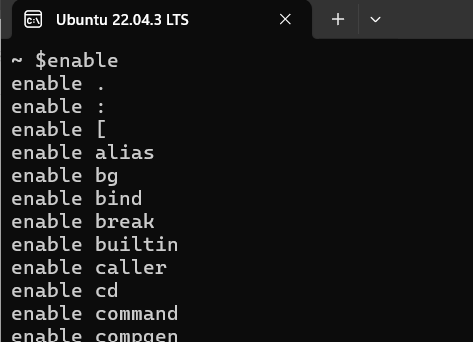
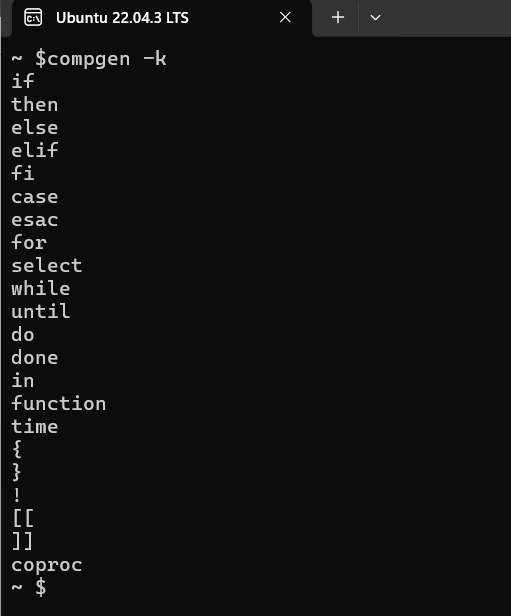
Bash comes with a variety of built-in commands and keywords for managing variables and executing scripts. You can explore these using commands like enable and compgen -k.
Conclusion
Understanding variables is fundamental to mastering Bash scripting. With the ability to store and manipulate data, variables empower you to create dynamic and efficient scripts. By following the guidelines outlined in this guide, you’ll be well on your way to harnessing the full potential of variables in your Bash scripts.